
The past week has been a lot in the security world. On October 21 PHP shipped emergency fixes for two critical remote code execution bugs (php2shell), and attackers were already using them that day. Researchers found them partly with an AI model. Node.js put out its own security release the same day, with a remote code execution bug in its Brotli decoder among the 10 fixes.
I think this is only the beginning. Security models, open source ones included, are getting much stronger, and people are pointing swarms of agents at real software to find bugs and get into servers. If you run your own servers, the usual best practices probably aren't enough anymore. I expect a lot more of these over the next few months.
Locking down our servers had been on my list for a while and I just didn't have the time. Then levelsio's post about getting your VPS off the public internet reminded me, so on Monday and Tuesday I blocked out the time and did all of it properly. When we finally looked, our production server had 5,009 failed SSH logins in the last week.
I started with an audit of the production box, run as root, so I could see who can log in, what's listening and what's actually running. Then I sat down with Claude Code and planned it in phases: what to clean up first, how to move SSH behind Tailscale without locking myself out, and when to reboot onto the new kernel with the least downtime for KaribuKit. Claude wrote the scripts and checked each step from my laptop. Every change on production went through me: I made the calls on what stays and what goes, I ran all the root commands myself, and Claude never had root on production.
Our apps run on dedicated servers at Hetzner: KaribuKit (our hotel PMS), SlopIt (blogs that coding agents can run), a few smaller products, and a lab box for experiments. Quick shout out to Hetzner here. I have three live servers there, I'm very happy with the service, and we're lucky enough to still be on the older prices. When the lab box needed a disk swapped during this work, support did it overnight at no charge.
What we found when we actually looked
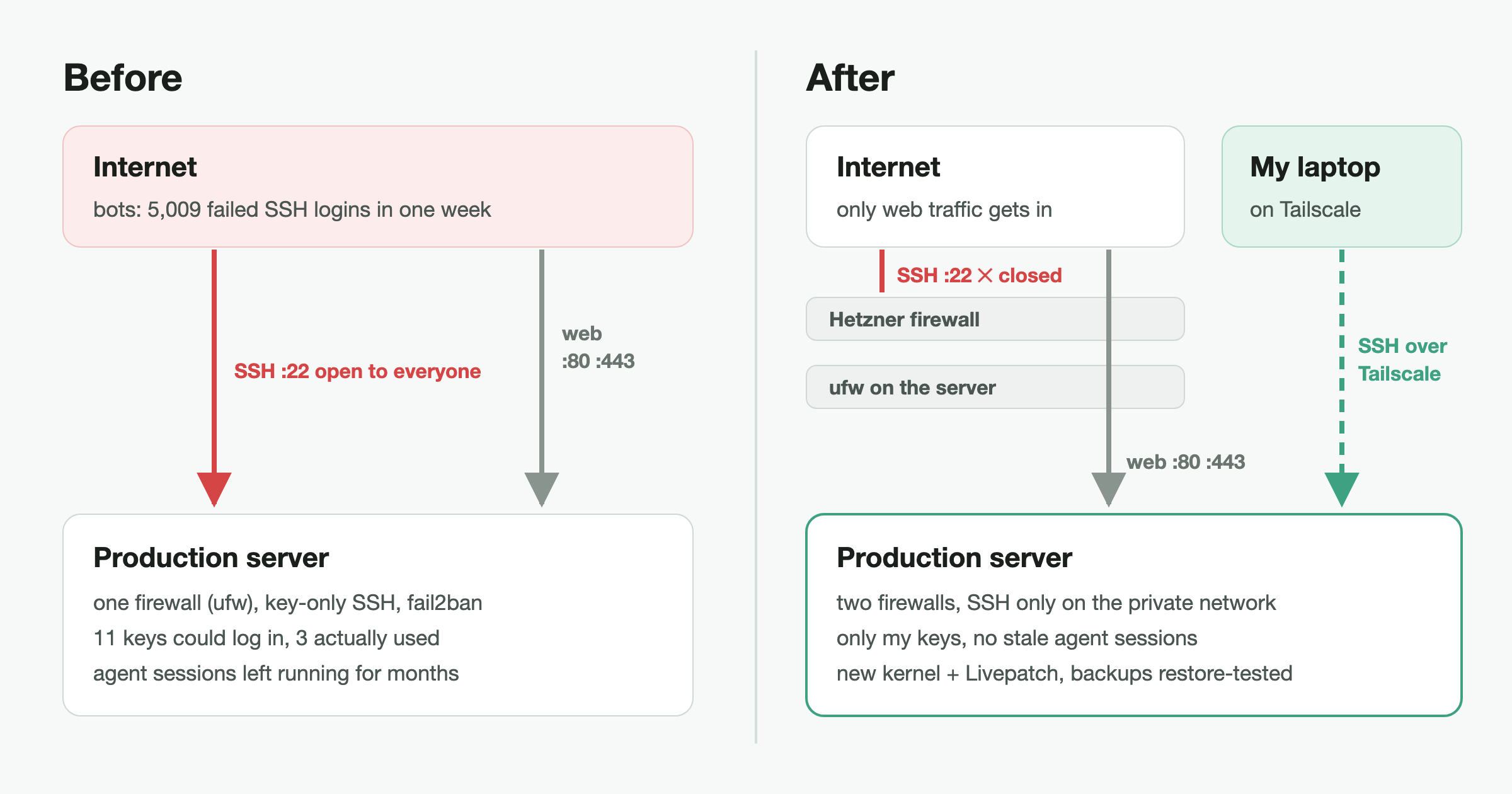
Our setup was the normal one. SSH keys only with fail2ban in front, and ufw letting in 22, 80 and 443. That's what most guides tell you to do, and it works. But when we ran a proper audit on the production box, a few numbers stood out:
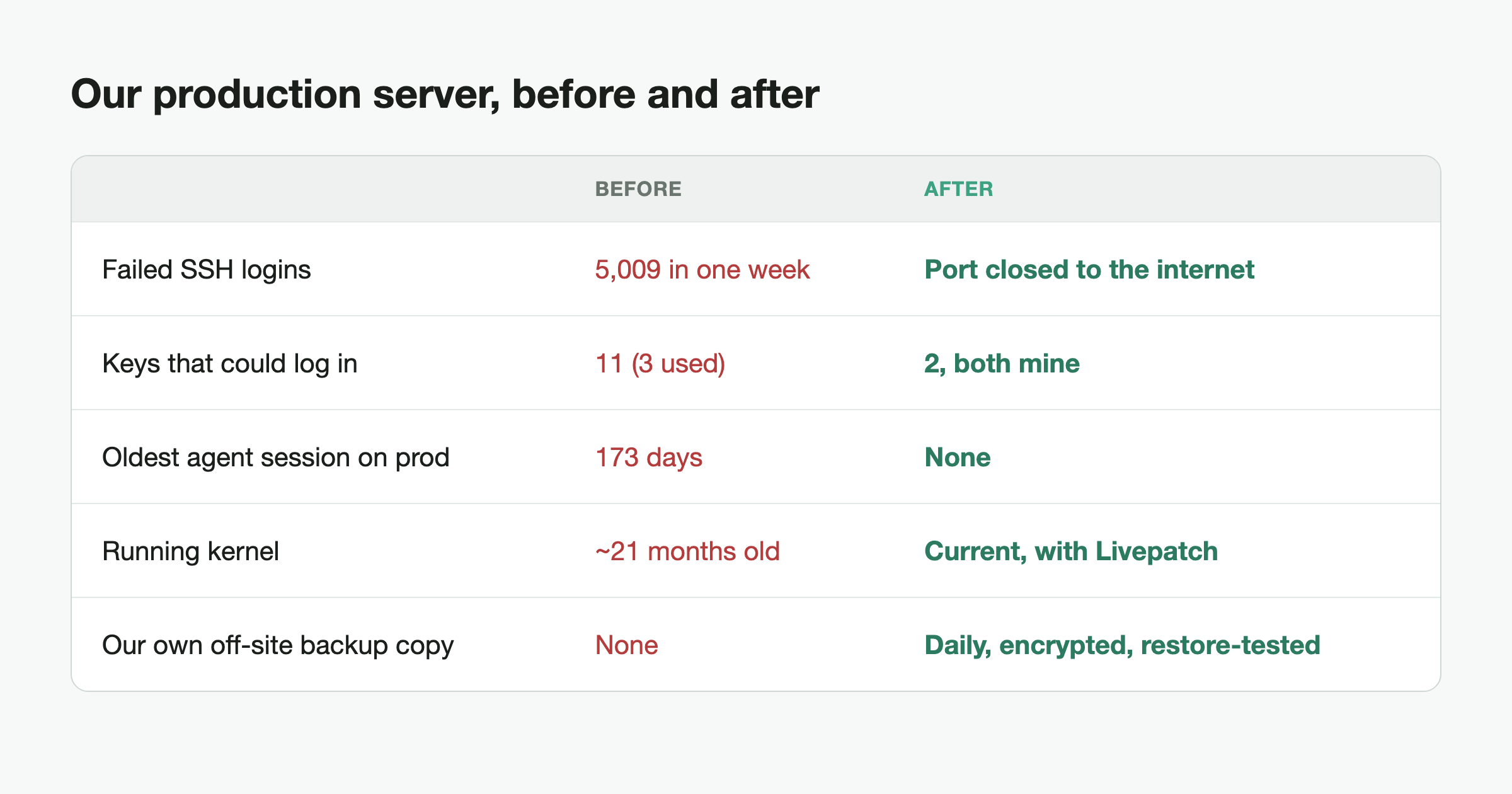
- 5,009 failed SSH logins in the last 7 days. fail2ban had banned more than 1,700 IPs over time. None got in. But bots were knocking on port 22 all day, every day, and one OpenSSH bug is all it takes (regreSSHion in 2024 hit before login, so it didn't matter that we only allowed keys).
- 11 SSH keys could log in, and only 3 had been used in the last month. Keys pile up as people join a project, help out and move on, and nobody goes back to clean them up.
- Coding-agent sessions had been running on production for months. Claude Code and Codex sessions started over SSH and were never closed, and the oldest was 173 days old.
- The server hadn't been rebooted in about 21 months. Security updates were installed but the server was still running the old kernel.
- Our own extra backup of the KaribuKit database was failing most days. The database is on Supabase's Pro plan, which keeps daily backups, so this was a backup of our backup and I wasn't too worried. It ran on my laptop at 2pm and showed a random pop-up asking for my admin password, and I always reject those. So between June and October it only worked on the days I ran it myself, 30 out of 146, and nothing told us when it didn't.
What we changed
SSH only over Tailscale
We installed Tailscale on the servers and our laptops, tested SSH over the tailnet with a second session still open, and then closed port 22 to the internet. A small access policy in Tailscale means our laptops can reach the servers, but the lab box can't reach production.
Two firewalls instead of one
ufw on the box, plus Hetzner's own firewall in front of it. One thing to know is that Hetzner's firewall for dedicated servers is stateless (unlike the Hetzner Cloud one). So if you only allow 80 and 443, you also block the replies to your server's own outgoing traffic and things like apt stop working. You need a rule for TCP replies (ACK flag, ports 32768-65535) and for DNS and NTP replies. Hetzner's docs explain it. While we were in there we deleted two old rules we didn't need anymore.
One set of keys on production
Only my keys can SSH into production now. Anyone else who needs a shell gets their own user on the lab server, without sudo or Docker. Deploys don't change, because our GitHub Actions runners connect out to GitHub and never needed inbound SSH. Those runners still run CI on the production box though, so anyone who can push to our repos can run code there, and moving CI to the lab box is next on the list.
No agents on production
We stopped the old sessions and retired one agent setup we weren't using anymore. New agent work goes on the lab box.
Docker doesn't respect ufw
We tested this on the freshly rebuilt lab box: a container started with a plain -p 18080:80 was reachable from the internet even though ufw blocked that port. Docker writes its own iptables rules and ufw never sees the traffic. We set "ip": "127.0.0.1" in /etc/docker/daemon.json, so published ports default to localhost, and added a DOCKER-USER rule that drops new connections from the public interface (Docker's docs describe the ufw problem). Testing again from outside, both a default -p and an explicit 0.0.0.0 publish were blocked.
A reboot, then Livepatch
KaribuKit and SlopIt were down for 2 minutes and 20 seconds, and I told the team before we did it. We then turned on Livepatch, part of Ubuntu Pro, so most kernel fixes now apply without a reboot.
Backups you've actually restored
KaribuKit's database is on Supabase, so it isn't on these servers at all, and Supabase already backs it up daily. We still want our own copy outside Supabase, so we rebuilt the laptop job as a plain pg_dump that logs in as a read-only database user, with its password stored in the macOS Keychain so there's no pop-up. Every dump gets checked before it's kept (size and table count).
We also restored a dump into a throwaway Postgres and compared row counts with live, and they matched. Every backup now also gets encrypted with age and copied to a Hetzner Storage Box (€3.20 a month plus VAT for 1 TB, with daily snapshots). That covers SlopIt's database too. If a job fails or doesn't run at all, Healthchecks.io emails me, and we tested that too.
How not to lock yourself out
I didn't want to lock myself out of production, so we did it in this order.
- Test SSH over Tailscale in a new terminal while your current session is still open. Only then close port 22.
- Compare the server's host key over the tailnet with the one you saw over the public IP, so you know it's the same box.
- Know your way back in if Tailscale ever breaks. On Hetzner that's a temporary firewall rule for your own IP plus the rescue system. We rehearsed it once on the lab box before touching production.
A quick check you can run today
# failed SSH logins in the last week
sudo journalctl -u ssh --since -7d | grep -cE 'Failed|Invalid user'
# who can log in as you
ssh-keygen -lf ~/.ssh/authorized_keys
# how long since the last reboot, and is one pending?
uptime -p; cat /var/run/reboot-required 2>/dev/null
# anything listening on all interfaces that shouldn't be?
sudo ss -tlnp | grep -v 127.0.0.1
— NJ
I run SimbaStack, where we build AI agents and the systems they work in, including KaribuKit and SlopIt from this post. If you need help getting an agent into production, tell me what you're building: nj@simbastack.com.